Electric windows
Introduction
Section titled “Introduction”This chapter contains information on the following subjects:
- Opening or closing the windows electrically
- Electric windows - functions
- Roll-back function for the electric windows
Additional information and warnings
Section titled “Additional information and warnings”Opening or closing the windows electrically
Section titled “Opening or closing the windows electrically”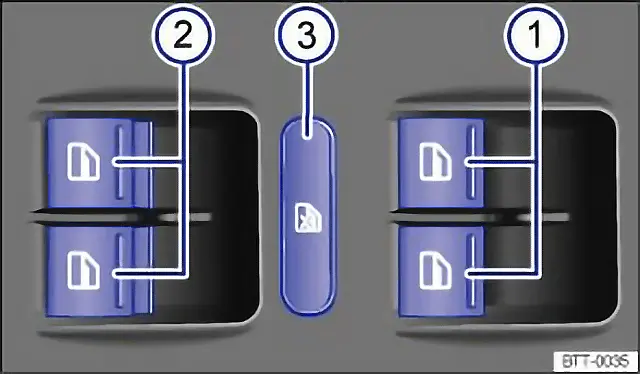
Fig. 32 In the driver door: buttons for the front and rear electric windows with one-touch opening and closing
First read and observe the introductory information and safety warnings .
Buttons in the driver door with one-touch opening and closing
Section titled “Buttons in the driver door with one-touch opening and closing”Key for fig. 32:
- Buttons for the windows in the front doors.
- Buttons for the windows in the rear doors.
- Safety button for switching the electric childproof lock on and off.
Opening and closing windows with one-touch opening and closing
Section titled “Opening and closing windows with one-touch opening and closing”| Function | Action |
|---|---|
| Opening: | Press the button |
| Closing: | Pull the button |
| Stopping the one-touch function | Press or pull the button for the appropriate window again |
The safety button 3 disables the electric window buttons in the rear doors. The yellow indicator lamp in the button will light up. |
The windows can still be operated using the buttons several minutes after the ignition has been switched off, provided that the driver door and front passenger door are not opened. If the vehicle key is removed from the ignition lock and the driver door is opened, all electric windows can be opened or closed by operating and holding the corresponding window button in the driver door. After a few seconds, convenience opening or closing is started.
Electric windows - functions
Section titled “Electric windows - functions”First read and observe the introductory information and safety warnings .
One-touch opening and closing
Section titled “One-touch opening and closing”One-touch opening and closing makes it possible to fully open and close the windows. The individual buttons do not have to be held down to do this.
For one-touch closing: pull the button for the appropriate window up briefly into the second position.
For one-touch opening: press the button for the appropriate window down briefly into the second position.
Stopping the one-touch function: press or pull the button for the appropriate window again.
Restoring one-touch opening and closing
Section titled “Restoring one-touch opening and closing”One-touch opening and closing is deactivated if the vehicle battery has been disconnected or discharged while the windows were not fully closed. The function will have to be reset.
- Close all windows and doors.
- Pull up the button for the window and hold it in this position for at least one second.
- Let go of the button, then pull it up again and hold it in this position. One-touch opening and closing is now ready for operation.
The one-touch function can be restored for individual windows or for several windows at the same time.
Convenience opening or closing
Section titled “Convenience opening or closing”The windows can be opened and closed from outside the vehicle using the vehicle key:
- Press and hold the locking or unlocking button on the vehicle key. All electric windows will be either opened or closed.
- To interrupt this function, let go of the locking button.
During convenience closing, first the windows and then the electric panorama sliding/tilting glass roof are closed.
If there is a fault in the electric window system, neither the one-touch function nor the roll-back function will work. Go to a qualified workshop.
Roll-back function for the electric windows
Section titled “Roll-back function for the electric windows”First read and observe the introductory information and safety warnings .
The roll-back function for the electric windows can reduce the risk of injuries when the windows are closing ⇒ . If the one-touch closing function for a window does not work because it is stiff or is being obstructed, the window will automatically open again.
- Check to see why the window has not closed.
- Try to close the window again.
- If the window is again prevented from closing within approximately 10 seconds of the first attempt because it is stiff or obstructed, the automatic closing function is switched off for approximately 10 seconds.
- If the window is still obstructed, the window stops at this point. To close the window without the roll-back function, press the button again within 10 seconds ⇒ .
Closing the window without the roll-back function
Section titled “Closing the window without the roll-back function”- Try to close the window again within approximately 10 seconds by holding the button. The roll-back function will be deactivated for a small section of the path of the closing window.
- If the closing procedure takes longer than approximately 10 seconds, the roll-back function will be reactivated. The window will then stop again if it is stiff or meets another obstacle.
- Please go to a qualified workshop if the window still cannot be closed.