Vehicle key set
Introduction
Section titled “Introduction”This chapter contains information on the following subjects:
Additional information and warnings
Section titled “Additional information and warnings”- Settings in the Volkswagen information system
- Central locking system
- Starting and stopping the engine
- Consumer information
- Manual opening and closing
Vehicle key
Section titled “Vehicle key”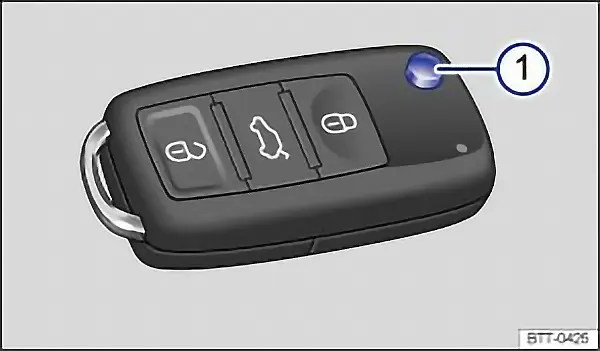
First read and observe the introductory information and safety warnings .
Vehicle key
Section titled “Vehicle key”The key can be used to lock and unlock the car from a distance ⇒ Description of the central locking system.
The remote control transmitter and the battery are integrated in the key. The receiver is located in the vehicle interior. The remote control range is several metres around the vehicle when the battery is fully charged.
If the vehicle cannot be opened and closed using the vehicle key, the vehicle key will have to be re-synchronised, or the battery in the key replaced.
Several vehicle keys can be used.
Opening and closing the key bit
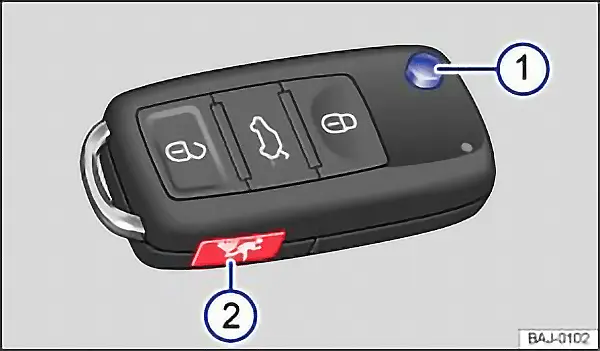
Section titled “Opening and closing the key bit”Press button ⇒ fig. 18 1 to release the key bit and fold it out.
To fold in, press button 1 and simultaneously fold in the key bit until it clicks into place.
Alarm button
Section titled “Alarm button”Only press the alarm button 2 in the event of an emergency. Once the button is pressed, the horn is sounded and the vehicle lights flash. Press the alarm button again to switch off the alarm.
Replacement key
Section titled “Replacement key”You will need to quote the vehicle chassis number when ordering a replacement key or additional remote control keys.
Every new key contains a microchip which must be encoded with the data for the vehicle’s electronic immobilizer. The vehicle key will not work if it is not fitted with a microchip, or if the microchip has not been encoded. The same goes for keys that have been cut to fit the vehicle.
New keys or replacement keys are available from Volkswagen dealerships or from qualified workshops and authorised key services that are qualified to manufacture these vehicle keys.
New and replacement vehicle keys must be synchronised before use. Go to a qualified workshop.
Press the buttons on the key only if the corresponding function is actually needed. Pressing a button when the function is not required could lead to the vehicle being unlocked unintentionally or the alarm going off. This also applies even when you are not within the effective range.
The function of the vehicle key can be affected temporarily if there is more than one transmitter in the direct vicinity working on the same frequency (e.g. a two-way radio or mobile telephone).
Obstacles between the key and the vehicle, bad weather conditions and discharged batteries all reduce the effective range.
If the buttons on the vehicle key ⇒ fig. 18 or fig. 19, or one of the central locking buttons, are pressed several times in quick succession, the central locking system switches off briefly to protect it from overloading. The vehicle is then unlocked. Lock the vehicle if necessary.
Indicator lamp in the vehicle key
Section titled “Indicator lamp in the vehicle key”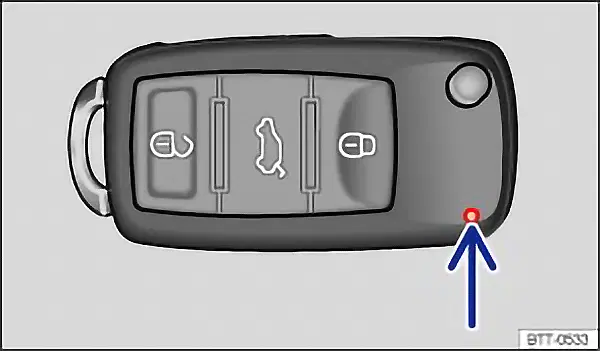
First read and observe the introductory information and safety warnings .
If a button on the vehicle key is pressed briefly, the indicator lamp ⇒ fig. 20 (arrow) flashes once. The lamp will flash several times if the button is pressed and held, e.g. convenience opening.
If the indicator lamp in the key does not light up when a button is pressed, the battery in the key needs to be changed ⇒ replacing the battery.
Replacing the battery
Section titled “Replacing the battery”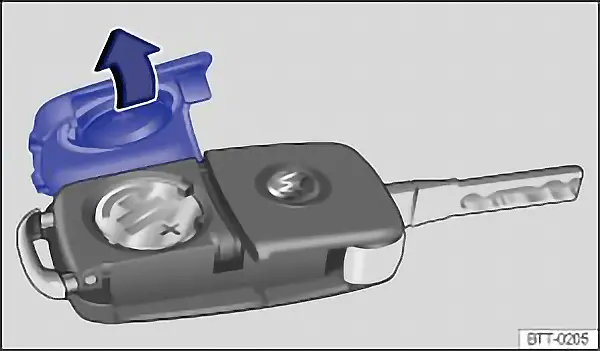
Fig. 21 Vehicle key: opening the battery case cover
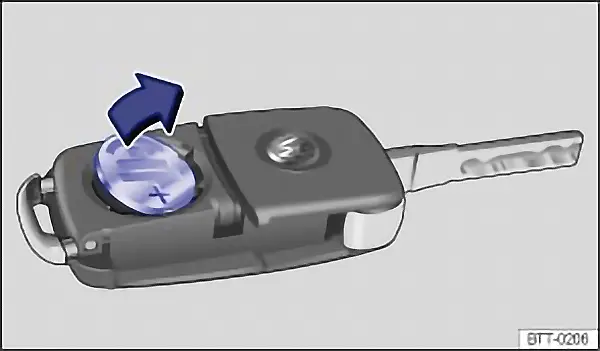
Fig. 22 Vehicle key: removing the battery
First read and observe the introductory information and safety warnings .
Volkswagen recommends having the battery changed at a Volkswagen dealership or by a qualified workshop. The battery is located on the rear side of the vehicle key underneath a cover.
Changing the battery
Section titled “Changing the battery”- Fold out the key bit of the vehicle key
- Pull up the cover on the rear side of the vehicle key ⇒ fig. 21 in the direction of the arrow ⇒
- Using a suitable thin object, lever the battery out of the battery compartment ⇒ fig. 22.
- Insert the new battery as shown in ⇒ fig. 22 and push it into the battery compartment against the direction of the arrow ⇒
- Fit the cover as shown in ⇒ fig. 21 and push it onto the vehicle key housing against the direction shown by the arrow until it engages.
Dispose of discharged batteries in an environmentally friendly manner.
The batteries in the vehicle key may contain perchlorate. Observe the legal requirements and regulations when handling and disposing of these components.
Synchronising the vehicle key
Section titled “Synchronising the vehicle key”First read and observe the introductory information and safety warnings .
It may no longer be possible to lock or unlock the vehicle with the remote control if the button is pressed repeatedly outside of the effective range of the vehicle key. If this is the case, the vehicle key should be re-synchronised as follows:
- Fold out the key bit of the vehicle key
- Press the button on the vehicle key. Remain standing close to the vehicle.
- Unlock the vehicle with the key bit within one minute. The synchronisation process is complete.
- Fold in the key bit of the vehicle key.