Changing gear
Introduction
Section titled “Introduction”This chapter contains information on the following subjects:
- Warning and indicator lamp
- Pedals
- Manual gearbox: selecting a gear
- Automatic gearbox: selecting a gear
- Changing gear using Tiptronic
- Driving with an automatic gearbox
- Fault in the function of the automatic gearbox
- Gear-change indicator
Notes in this chapter concerning the automatic gearbox are applicable both for the automatic gearbox and the dual clutch gearbox DSG®.
The following will occur if reverse gear is selected and the ignition is switched on
Section titled “The following will occur if reverse gear is selected and the ignition is switched on”- The reverse light comes on.
- The Climatronic switches automatically to air recirculation mode when the vehicle is reversing.
- The rear window wiper is switched on if the windscreen wipers are switched on.
- The ParkPilot may switch on.
Additional information and warnings
Section titled “Additional information and warnings”- Overview of the centre console
- Instruments
- Windscreen wiper/washer
- Braking, stopping and parking
- Pull-away assist systems
- ParkPilot
- Heating, ventilating, cooling
- Engine management system and exhaust purification system
- Manual opening and closing
- Tow-starting and towing
Warning and indicator lamp
Section titled “Warning and indicator lamp”First read and observe the introductory information and safety warnings .
| Lit up | Possible cause | Solution |
|---|---|---|
| Dual clutch gearbox DSG® overheated. | Do not drive on! Move the selector lever to position P and leave the gearbox to cool down. If the warning lamp does not go out, do not continue to drive. Seek expert assistance. Failure to do so can cause considerable damage to the gearbox ⇒ Braking, stopping and parking. | |
| Brake pedal not depressed. | To select a position, press the brake pedal ⇒ Braking, stopping and parking. |
| Flashes | Possible cause | Solution |
|---|---|---|
| The lock button in the selector lever is not engaged. The vehicle cannot drive off. | Engage the selector lever lock. | |
| Fault in automatic gearbox. flashes alternately with the selector lever display, e.g. D. | Drive to the nearest qualified workshop immediately at a low engine speed to have the system checked. |
Several warning and indicator lamps will light up briefly as a functional check when the ignition is switched on. They will switch off after a few seconds.
Pedals
Section titled “Pedals”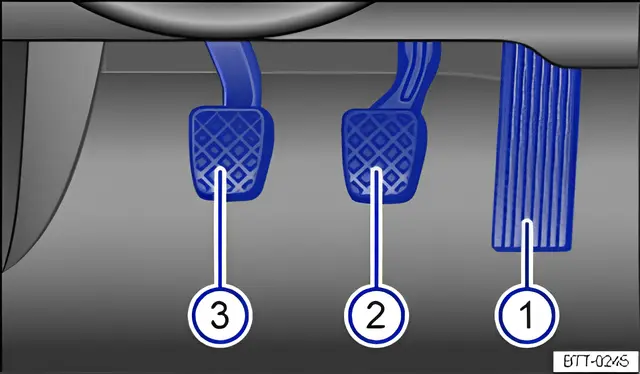
Fig. 110 Pedals in vehicles with a manual gearbox: 1 accelerator, 2 brake pedal, 3 clutch pedal
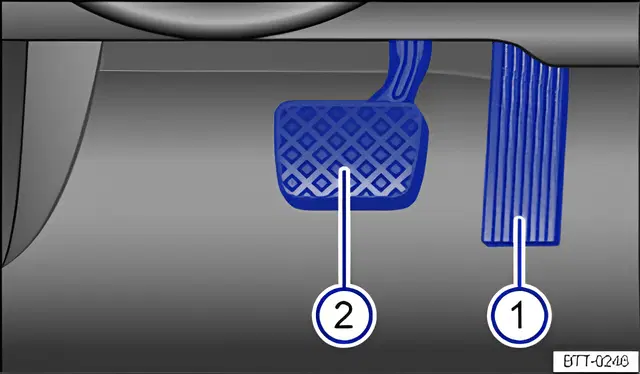
Fig. 111 Pedals in vehicles with an automatic gearbox: 1 accelerator, 2 brake pedal
First read and observe the introductory information and safety warnings .
The operation and freedom of movement of all pedals must never be impaired by objects or floor mats.
Only use floor mats that leave the pedal area free and can be securely fastened in the footwell.
If a brake circuit fails, you will have to depress the brake pedal further than normal in order to bring the vehicle to a stop.
Manual gearbox: selecting a gear
Section titled “Manual gearbox: selecting a gear”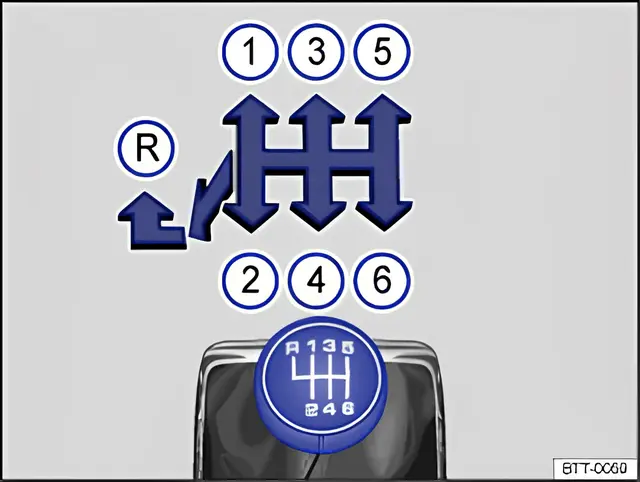
Fig. 112 Gear shift pattern of a 5 or 6‑speed manual gearbox
First read and observe the introductory information and safety warnings .
The positions of the individual driving gears are shown on the gearshift lever ⇒ fig. 112.
- Fully depress and hold the clutch pedal.
- Move the gear lever to the required position ⇒ .
- Release the clutch to engage.
In some countries, the clutch pedal will have to be depressed fully in order to start the engine.
Selecting reverse gear
Section titled “Selecting reverse gear”- Reverse gear should only be selected when the vehicle is stationary.
- Fully depress and hold the clutch pedal ⇒ .
- Move the gear lever to the neutral position and push down.
- Push the gearshift lever fully to the left and then to the front in the reverse gear position R.
- Release the clutch to engage.
Shifting down
Section titled “Shifting down”You should always select the next immediate gear when shifting down a gear whilst the vehicle is in motion. The engine revs should not be too high when doing this ⇒ . Damage to the clutch and the gearbox can occur if one or more gears are skipped when shifting down a gear at high speeds or high engine revs, even if the clutch is not released in the process ⇒ .
Automatic gearbox: selecting a gear
Section titled “Automatic gearbox: selecting a gear”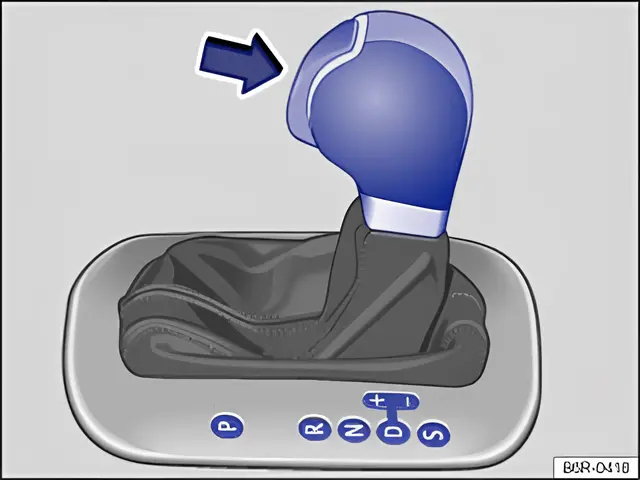
Fig. 113 Left-hand drive vehicles: selector lever for automatic gearbox with lock button (arrow)
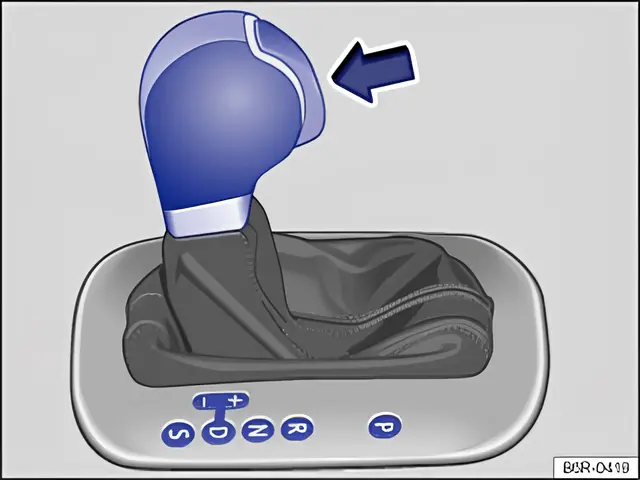
Fig. 114 Right-hand drive vehicles: selector lever for automatic gearbox with lock button (arrow)
First read and observe the introductory information and safety warnings .
The selector lever is equipped with a selector lever lock. When changing the selector lever position from P to a driving gear, depress the brake pedal and push the lock button in the selector lever in the direction of the arrow ⇒ fig. 113 or ⇒ fig. 114. To move the selector lever out of position N to position D or R, first depress and hold the brake pedal.
The current selector lever position will be shown in the instrument cluster display if the ignition is switched on.
| Selector lever position | Designation | Meaning ⇒ |
|---|---|---|
| P | Parking lock | The drive wheels are locked mechanically. May only be selected when the vehicle is stationary. To disengage this selector lever position, depress the brake pedal and also switch on the ignition. |
| R | Reverse gear | Reverse gear is selected. May only be selected when the vehicle is stationary. |
| N | Neutral | The gearbox is in the neutral position. No force is transmitted to the wheels and the braking effect of the engine is not available. |
| D | Standard driving position (normal programme) | All forward gears are shifted up and down automatically. The timing of the gear shift is determined by the engine load, your individual driving style and the speed of the vehicle. |
| S | Standard driving position (sport programme) | All forward gears are automatically changed up and down at higher engine speeds than in selector lever position D. This uses the full power available from the engine. The timing of the gear shift is determined by the engine load, your individual driving style and the speed of the vehicle. |
Selector lever lock
Section titled “Selector lever lock”The selector lever lock in position P or N prevents gears from being engaged inadvertently, which would cause the vehicle to move.
To release the selector lever lock with the ignition switched on, depress and hold the brake pedal. Press the lock button in the selector lever at the same time.
The selector lever lock is not engaged if the selector lever is moved quickly through position N (e.g. when shifting from R to D). This makes it possible, for instance, to rock the vehicle backwards and forwards if it is stuck in snow or mud. The selector lever lock engages automatically if the brake pedal is not being depressed, the lever is in position N for more than about one second and the vehicle is travelling no faster than approximately 5 km/h (3 mph).
In rare cases, the selector lever lock may not engage in vehicles with a dual clutch gearbox DSG®. The drive is then deactivated to prevent the vehicle from accidentally pulling away. The green indicator lamp flashes and an information message is also displayed. Use the following procedure to engage the selector lever lock:
Move the selector lever to position P or N and then select a driving gear.
If the lever is moved accidentally to N when driving, take your foot off the accelerator. Wait for the engine revs in the neutral position before selecting a position again.
Changing gear using Tiptronic
Section titled “Changing gear using Tiptronic”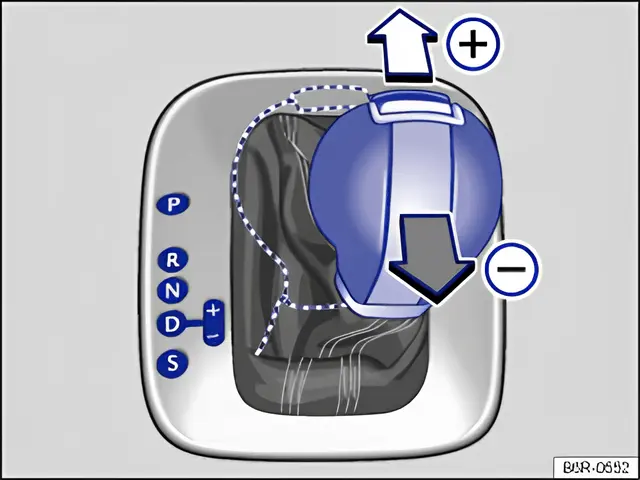
Fig. 115 Selector lever in Tiptronic position (left-hand drive). The controls are mirrored for right-hand drive vehicles
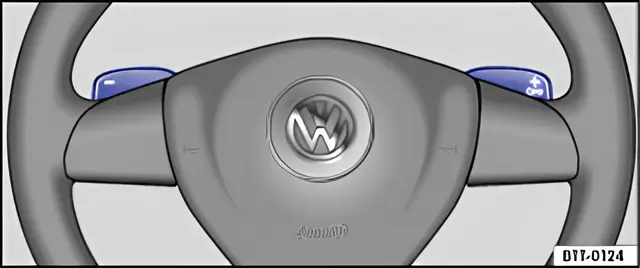
Fig. 116 Steering wheel with paddles for Tiptronic
First read and observe the introductory information and safety warnings .
Using Tiptronic, the gears can be shifted up and down manually in an automatic gearbox. The gear that is currently selected will be maintained when the Tiptronic programme is selected. This remains the case until the system does not perform a gear change due to the current driving situation.
Operating Tiptronic with the selector lever
Section titled “Operating Tiptronic with the selector lever”- Push the selector lever in position D to the right into the Tiptronic gate ⇒ Automatic gearbox: selecting a gear.
- Gently push the selector lever forwards + or back - to shift gear up or down ⇒ fig. 115.
Operating Tiptronic with the paddles
Section titled “Operating Tiptronic with the paddles”- With driving programme D or S selected, use the paddles on the steering wheel ⇒ fig. 116.
- Pull the right paddle + OFF towards the steering wheel to change up a gear.
- Pull the left paddle - towards the steering wheel to change down a gear.
- To leave Tiptronic mode, pull the right paddle + OFF towards the steering wheel for approximately one second.
The Tiptronic mode will automatically be closed if the paddles are not used for some time.
Driving with an automatic gearbox
Section titled “Driving with an automatic gearbox”First read and observe the introductory information and safety warnings .
The gearbox changes the forward gears up and down automatically.
Driving down hills
Section titled “Driving down hills”The steeper the gradient, the lower the gear you will need. Lower gears increase the braking effect of the engine. Never allow the vehicle to roll down mountains or hills in the neutral position N.
- Reduce your speed.
- Push the selector lever from position D to the right into the Tiptronic gate ⇒ Operating Tiptronic with the selector lever.
- Gently push the selector lever to the rear to change down gear.
- OR: shift down a gear using the paddles on the steering wheel ⇒ Operating Tiptronic with the paddles.
Stopping the vehicle and pulling away when driving uphill
Section titled “Stopping the vehicle and pulling away when driving uphill”The steeper the incline, the lower the gear that is required.
If you wish to stop the vehicle or pull away when driving uphill you should use the Hill Hold Assist function ⇒ Hill Hold Assist.
Vehicles without Hill Hold Assist: when you stop the vehicle on an incline and a position is still selected, the vehicle must always be prevented from rolling by depressing the brake pedal or by applying the handbrake. The brake pedal or the handbrake should not be released until you start to pull away ⇒ .
Kickdown
Section titled “Kickdown”The kickdown mechanism enables maximum acceleration in the selector lever positions D and S, or in the Tiptronic position. If the accelerator pedal is depressed fully, the gearbox will automatically shift to a lower gear, depending on the speed and engine revs. This will make use of the full vehicle acceleration ⇒ .
The gearbox does not shift up to the next gear until the engine reaches the maximum engine speed for the gear.
Fault in the function of the automatic gearbox
Section titled “Fault in the function of the automatic gearbox”First read and observe the introductory information and safety warnings .
Emergency programme
Section titled “Emergency programme”There is a fault in the system if all the displays on the instrument cluster for the selector lever positions have a light background. The automatic gearbox is running in an emergency programme. The vehicle can still be driven in the emergency programme, but only at reduced speed and not in all gears.
In vehicles with a dual clutch gearbox DSG®, you may no longer be able to select reverse gear.
In all cases the automatic gearbox should be checked by a qualified workshop immediately.
Overheating in the dual clutch gearbox DSG®
Section titled “Overheating in the dual clutch gearbox DSG®”The dual clutch gearbox can overheat when the vehicle pulls off regularly, travels at a crawl for long periods, or in stop and go traffic. Gearbox overheating is indicated by the warning lamp and in some cases by a text message on the instrument cluster display. A signal tone may also be given. Stop the vehicle and allow the gearbox to cool down ⇒ .
The vehicle does not move forwards or backwards even though a position has been selected
Section titled “The vehicle does not move forwards or backwards even though a position has been selected”If the vehicle will not move in the required direction, the system may have selected the position incorrectly. Depress the brake pedal and reselect the position.
If the vehicle still does not move in the required direction, there is a system fault. Seek expert assistance and have the system checked.
Gear-change indicator
Section titled “Gear-change indicator”First read and observe the introductory information and safety warnings .
In some vehicles, the instrument cluster will show which gear should be selected while the vehicle is in motion to reduce fuel consumption:
| Display | Meaning |
|---|---|
| The current gear is optimal. | |
| A higher gear is recommended. | |
| A lower gear is recommended. |
In vehicles with a manual gearbox the recommended gear will be indicated in the form of a number and a recommendation to shift up or down into the gear shown will be displayed in the form of an arrow.
In vehicles with an automatic gearbox, if the selector lever is in the Tiptronic position, the current gear will be indicated in the form of a number and a recommendation to shift up or down a gear will be displayed in the form of an arrow ⇒ Changing gear using Tiptronic.
Information on cleaning the diesel particulate filter
Section titled “Information on cleaning the diesel particulate filter”The exhaust management system detects when a diesel particulate filter is filling up and aids the filter’s self-cleaning process by recommending the most suitable gear when driving. This may mean driving with increased engine speed in exceptional cases ⇒ Engine management system and exhaust purification system.
Driving in the correct gear can reduce fuel consumption.
Gear-change indicator display goes out when the clutch is depressed in vehicles with a manual gearbox or when Tiptronic position is deselected in vehicles with an automatic gearbox.