Instruments
Introduction
Section titled “Introduction”This chapter contains information on the following subjects:
When the outside temperature is low, the display in the instrument cluster may take slightly longer to appear than it does when the outside temperature is higher.
Additional information and warnings:
- Warning and indicator lamps
- Volkswagen information system
- Selected gear display (for vehicles with an automatic gearbox) ⇒ Changing gear
- Information on service intervals ⇒ booklet Service schedule.
Instrument overview
Section titled “Instrument overview”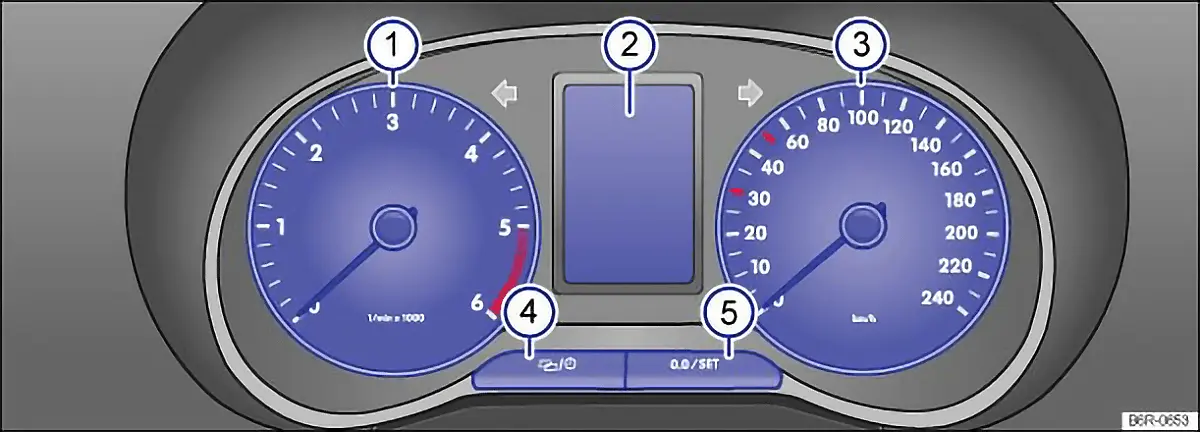
First read and observe the introductory information and safety warnings .
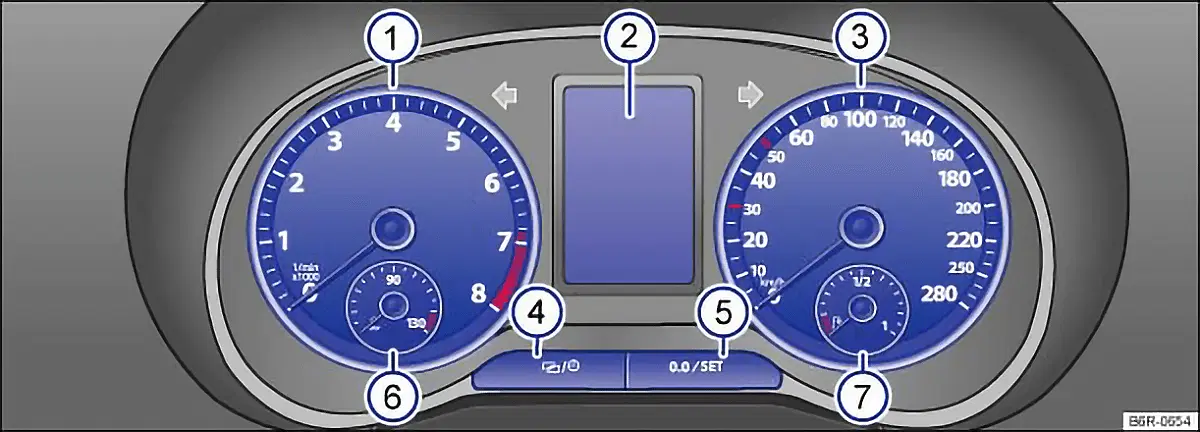
Descriptions of the instruments ⇒ fig. 10 or ⇒ fig. 11
- Rev. counter (running engine speed in revolutions x 1,000 per minute).
The start of the red zone on the dial indicates the maximum engine speed that may be used in each gear when the engine is warm and after it has been run in properly. You should change up a gear or move the selector lever to D, or lift your foot off the accelerator, before the needle reaches the red zone ⇒ . - Displays
- Speedometer
- Setting button for the clock
- Press the / , to mark either the hours or minutes display.
- Press the 0.0 / SET, to set the time 5. Press and hold to scroll through quickly.
- Press the / button again to finish setting the clock.
- Reset button for the trip recorder display (trip).
- Press the 0.0 / SET, to reset to 0.
- Engine coolant temperature display or autogas fuel tank display in vehicles with an autogas engine.
- Fuel gauge.
Displays
Section titled “Displays”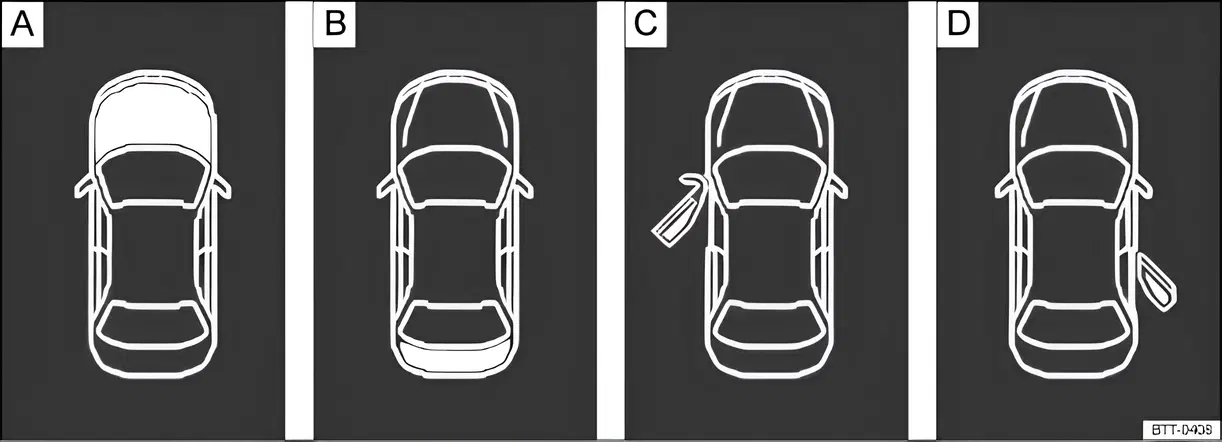
Fig. 12 A: bonnet open, B: tailgate open, C: front left door open, D: right rear door open (only in four-door vehicles)
First read and observe the introductory information and safety warnings .
The instrument cluster display ⇒ fig. 10 2 or ⇒ fig. 11 2 can show a variety of information, depending on the vehicle equipment level:
- Open doors, bonnet and tailgate ⇒ fig. 12
- Warning and information messages
- Mileage displays
- Time
- Outside temperature
- Selector lever positions
- Multifunction display (MFD) and menus for various settings ⇒ Volkswagen information system
- Service interval display
- Speed warning for winter tyres
- Second speed (Settings menu) ⇒ Volkswagen information system
- Status display for active cylinder management (ACT)
- Symbols for driver assist systems (start/stop system status)
- Fuel gauge
Open doors, bonnet and tailgate
Section titled “Open doors, bonnet and tailgate”The instrument cluster display indicates if any doors, or the bonnet or tailgate, are open once the vehicle has been unlocked, and while the vehicle is in motion. In some cases, a signal tone is also given. Different instrument cluster designs will have different displays.
| Key for ⇒ fig. 12: | See | |
|---|---|---|
| A | Do not drive on! Bonnet open or not properly closed. | ⇒ Preparation for working in the engine compartment |
| B | Do not drive on! Tailgate open or not closed properly. | ⇒ Tailgate |
| B | Do not drive on! Vehicle door open or not properly closed. | ⇒ Doors |
Warning and information messages
Section titled “Warning and information messages”The system checks certain components and functions in the vehicle when the ignition is switched on or while the vehicle is in motion. Functional faults are indicated by red and yellow symbols with warning and information messages on the instrument cluster display (⇒ Warning and indicator lamps). An acoustic warning is also given in certain cases. Different instrument cluster designs will have different displays.
| Type of message | Symbol colour | Explanation |
|---|---|---|
| Priority 1 warning report. | Red | The symbol flashes or lights up - sometimes together with a signal tone. Do not drive on! Danger! ⇒ Check function and resolve problem. Seek expert assistance if necessary. |
| Priority 2 warning report. | Yellow | The symbol flashes or lights up - sometimes together with a signal tone. If there is a fault, or if service fluids are running low, your vehicle could be damaged or break down ⇒ ! Check the fault as soon as possible. Seek expert assistance if necessary. |
| Information message. | — | Information about various procedures within the vehicle. |
Mileage displays
Section titled “Mileage displays”The odometer registers the total distance travelled by the car.
- Press the / , to mark either the hours or minutes display ⇒ fig. 10 4 or ⇒ fig. 11 4.
- Press the 0.0 / SET, to set the time ⇒ fig. 10 5 or ⇒ fig. 11 5. Press and hold to scroll through quickly.
- Press the / button again to finish setting the clock.
The trip recorder (trip) shows the distance travelled since the trip recorder was last reset. The final digit shows distances of 100 m.
Outside temperature display
Section titled “Outside temperature display”If the outside temperature falls below +4 °C (+39 °F), the display also shows a snowflake symbol (ice warning). This symbol flashes and then remains constantly lit until the outside temperature rises above +6 °C (+43 °F) ⇒ . When the vehicle is stationary or travelling at very low speeds, the temperature displayed may be slightly higher than the actual outside temperature as a result of the heat radiated from the engine. The measuring range lies between -40 °C (-40 °F) and +50 °C (+122 °F).
Selector lever positions
Section titled “Selector lever positions”The gear selected is displayed on the side of the selector lever and can also be displayed in the instrument cluster. The display may show which gear has been selected if the lever is in D or S, or in Tiptronic mode.
Gear change indicator
Section titled “Gear change indicator”While the vehicle is in motion, the instrument cluster may show which gear should be selected to reduce fuel consumption ⇒ Changing gear.
Second speed display (mph or km/h)
Section titled “Second speed display (mph or km/h)”In addition to the speedometer display, the speed can also be displayed in another unit of measurement (mph or km/h) while you are driving. To do this select the menu option Alt. speed dis. in the Settings menu ⇒ Volkswagen information system. Vehicles without menu display on the instrument cluster:
- Start the engine.
- Press the / 3 times. The odometer in the instrument cluster display flashes.
- Press the 0.0 / SET once. The vehicle speed in km/h or mph is shown briefly in the display instead of the odometer.
- This activates the second speed display. It can be deactivated in the same manner.
It is not possible to switch off the second speed display in those countries where the law stipulates that the display cannot be deactivated.
Start/stop system status display
Section titled “Start/stop system status display”The instrument cluster display shows information about the current status ⇒ Start/stop system.
Status display for active cylinder management (ACT)
Section titled “Status display for active cylinder management (ACT)”Depending on the equipment level, some vehicles additionally show the current number of active cylinders in the instrument cluster display, e.g. 2-cyl. mode or 4-cyl. mode. To do this, select the menu option Current consumption, Average consumption or Range in the MFD menu ⇒ Volkswagen information system.
Different instrument clusters are fitted, so the design and the display may differ. On a display without warning and information messages, faults are indicated by the indicator lamps alone.
If there are several warning messages, the symbols appear one after another for a few seconds each. The symbols keep appearing until the cause has been resolved.
Service interval display
Section titled “Service interval display”First read and observe the introductory information and safety warnings
The service display is shown on the instrument cluster ⇒ fig. 10 2 or ⇒ fig. 11 2
Service schedules at Volkswagen are divided into two categories: oil change service and inspection. The service interval display provides information on the next service which includes an oil change and on the next scheduled inspection. Scheduled services can also be found in the service schedule (and on the sticker on the door pillar).
The service appointment currently displayed can be found, in vehicles without text messages, on the top right of the instrument cluster display:
- 1: oil change service.
- 2: inspection.
In vehicles with fixed oil change service, services take place at predefined intervals.
The service intervals are calculated on an individual basis in vehicles with flexible oil change service (LongLife service). The flexible oil change is a service offered by Volkswagen to ensure that the oil is only changed when necessary. The length between the oil change services (maximum of 2 years) is also determined by the conditions under which the vehicle is used and personal driving style.
The service reminder is displayed 20 days before the service is due. The distance is rounded to the nearest 100 km; the remaining time is rounded to full days. The current service information cannot be called up until you have driven 500 km since the last service. Until this point the display only shows lines.
Service reminder
Section titled “Service reminder”If the vehicle is due to be serviced, a service reminder will appear on the display when the ignition is switched on. In vehicles without text messages a spanner symbol will appear on the instrument cluster along with a display in km and a clock symbol showing the time left before the next service appointment is due in days. The number of kilometres shown corresponds to the maximum number of kilometres that can still be driven until the service appointment is due. In addition, the top right corner of the display will show which reminder applies to which service appointment (1 for oil change service, 2 for inspection).
If the service reminder is displayed for both service appointments (1 and 2 in the top right corner of the instrument cluster display), the distance and the display in days for the next service appointment applies in vehicles without text messages.
In vehicles with text messages, Oil change or Inspection in --- km or --- days appears in the display.
Service
Section titled “Service”When the service is due, a signal tone sounds when the ignition is switched on and a flashing spanner symbol appears for a few seconds . In vehicles with text messages, Oil change now! or Inspection now! appears in the instrument cluster display.
Accessing a service message
Section titled “Accessing a service message”You can call up the current service message whenever the ignition is switched on, the engine is not running and the vehicle is stationary:
- Press the / button in the instrument cluster as often as needed until the spanner symbol and 1 in the top right corner of the display appear. The values shown apply to the oil change service.
- Press the / button on the instrument cluster again. The spanner symbol and the number 2 will appear in the top right corner of the display. The values shown apply to the inspection.
- OR: select the Settings menu.
- Select the menu option Info in the Service submenu.
An overdue service is indicated by a minus sign in front of the mileage or trip reading.
Resetting oil change service
Section titled “Resetting oil change service”If the oil change service was not performed by a Volkswagen workshop, it can be reset as follows:
Vehicles with text messages:
- Switch off the ignition.
- Press the 0.0 / SET button in the instrument cluster and hold it down.
- Restart the ignition.
- Release the 0.0 / SET button.
- Confirm the selection on the instrument cluster by pressing the OK/RESET button on the windscreen wiper lever or the OK button on the multifunction steering wheel.
Vehicles without text messages:
- Switch off the ignition.
- Press the 0.0 / SET button in the instrument cluster and hold it down.
- Restart the ignition.
- Release the 0.0 / SET button and press the / button within approximately 20 seconds.
Do not reset the display between service intervals, as this will falsify the display.
If you manually reset the service interval display while flexible oil change service is valid, fixed oil change service will be activated. The service interval will no longer be calculated on an individual basis ⇒ booklet Service schedule.
Resetting inspection
Section titled “Resetting inspection”If the inspection was not performed by a Volkswagen workshop, it can be reset as follows:
Vehicles with text messages:
- Switch off the ignition.
- Switch on the hazard warning lights.
- Press the 0.0 / SET button in the instrument cluster and hold it down.
- Restart the ignition.
- Release the 0.0 / SET button.
- Confirm the selection on the instrument cluster by pressing the OK/RESET button on the windscreen wiper lever or the OK button on the multifunction steering wheel.
- Switch off the hazard warning lights.
Vehicles without text messages:
- Switch off the ignition.
- Switch on the hazard warning lights.
- Press the 0.0 / SET button in the instrument cluster and hold it down.
- Restart the ignition.
- Release the 0.0 / SET button and press the / button within approximately 20 seconds.
- Switch off the hazard warning lights.
The service message will disappear after a few seconds, when the engine is running, or when the OK/RESET button on the windscreen wiper lever or the OK button on the multifunction steering wheel.
If the vehicle battery is disconnected for long periods in a vehicle with flexible oil change service, the system will not be able to calculate when the next service is due. The service displays could then show incorrect information. If this is the case, please observe the maximum service intervals shown in ⇒ booklet Service schedule.
Useful links: