ParkPilot
Introduction
Section titled “Introduction”This chapter contains information on the following subjects:
The ParkPilot assists the driver when manoeuvring and parking.
The ultrasound sensors in the rear bumper transmit and receive ultrasonic waves. The system uses the time difference between the ultrasonic waves (i.e. between the transmission and reflection from obstacles and the point of reception) to continuously calculate the distance between the bumper and the obstacle.
Additional information and warnings
Section titled “Additional information and warnings”- Exterior views
- Braking, stopping and parking
- Cleaning and caring for the vehicle exterior
- Accessories, modifications, repairs and renewal of parts
- Radio or navigation system ⇒ booklet Radio, or ⇒ booklet Navigation system
Please contact a qualified workshop if there is a fault in the system. Volkswagen recommends using a Volkswagen dealership for this purpose.
Volkswagen recommends that drivers practise using the ParkPilot in a traffic-calmed area or car park to allow them to familiarise themselves with the system and its functions.
Operating ParkPilot
Section titled “Operating ParkPilot”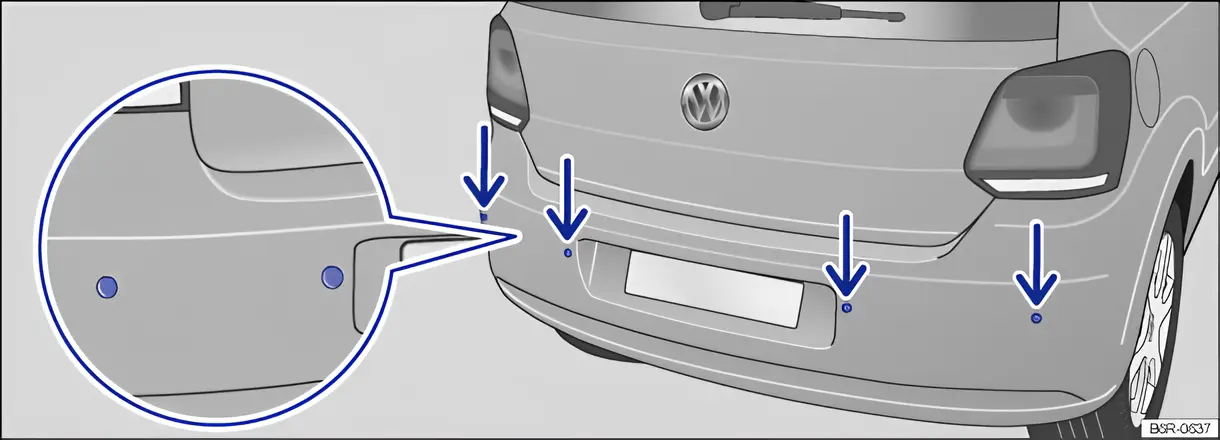
Fig. 122 In the rear bumper: ParkPilot ultrasound sensors
First read and observe the introductory information and safety warnings .
The ParkPilot uses ultrasound sensors to determine the distance between the rear bumper and an obstacle. There are 4 ultrasound sensors in the rear bumper ⇒ fig. 122 (arrows).
Switching ParkPilot on and off
Section titled “Switching ParkPilot on and off”| Function | What to do when the ignition is switched on |
|---|---|
| Switching on the ParkPilot automatically. | Select reverse gear or move the selector lever to position R. |
| Switching the display off manually. | Press a function selection button on the factory-fitted radio or navigation system. OR: touch the function button on the screen. |
| Switching off the ParkPilot automatically. | Approximately 10 seconds after shifting out of reverse gear, or selector lever position R, with an active ParkPilot screen display ⇒ fig. 123 or ⇒ fig. 124. OR: immediately after shifting out of reverse gear, or selector lever position R, with an inactive ParkPilot screen display ⇒ fig. 123 or ⇒ fig. 124. OR: accelerate forwards faster than approximately 10 - 15 km/h (6 - 9 mph) with active ParkPilot screen display ⇒ fig. 123 or ⇒ fig. 124. |
Special features of ParkPilot
Section titled “Special features of ParkPilot”- In some cases, the ParkPilot registers water and ice on the ultrasound sensors as an obstacle.
- The acoustic signal will become quieter after a few seconds if the distance remains the same. The volume will remain constant if the signal tone is continuous.
- As soon as the vehicle moves away from an obstacle again, the intermittent signal tone switches off automatically. If the vehicle approaches the obstacle again, the acoustic warning is switched on automatically.
- The ParkPilot cannot be switched on if the factory-fitted towing bracket is electrically connected to the trailer.
- No acoustic signal is given in vehicles with an automatic gearbox if the selector lever is in position P.
- A Volkswagen dealership can adjust the volume of the acoustic signals.
If there is a function fault in the ParkPilot, an acoustic warning is emitted for approximately 3 seconds when switched on for the first time. The ParkPilot should be checked by a qualified workshop immediately.
Acoustic and optical ParkPilot signals at the rear of the vehicle
Section titled “Acoustic and optical ParkPilot signals at the rear of the vehicle”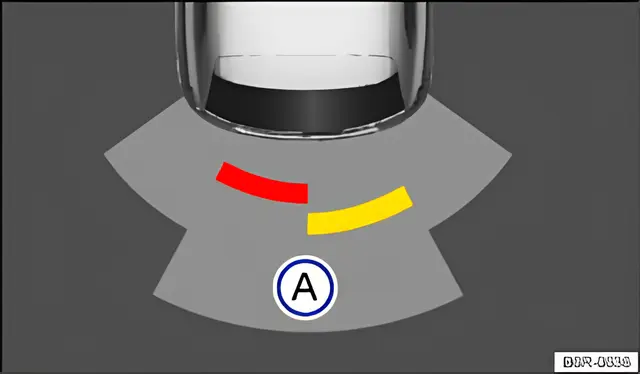
Fig. 123 ParkPilot screen display (colour)
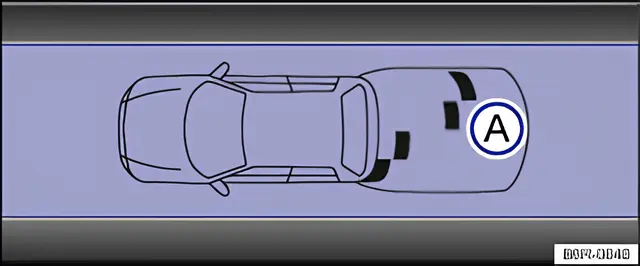
Fig. 124 ParkPilot screen display (monochrome)
First read and observe the introductory information and safety warnings .
Key for displays
| fig. 123 or fig. 124 | Meaning |
|---|---|
| A | Scanned area behind the vehicle. |
| Yellow segment depicts an obstacle. | |
| Red segment depicts an obstacle located close to the vehicle. | |
| Black segment depicts an obstacle (monochrome display). |
The area to the rear of the vehicle is scanned by the ultrasound sensors and is shown on the display of the factory-fitted radio or navigation system. The positions of potential obstacles are displayed relative to the vehicle ⇒ .
Acoustic signals and screen
Section titled “Acoustic signals and screen”Acoustic signals are given when the vehicle approaches an obstacle located to the rear. An intermittent signal tone is given if a sufficiently short distance between the vehicle and an obstacle is detected. The shorter the distance, the shorter the intervals. The signal tone will sound continuously if the obstacle is very close.
If you continue to drive the vehicle closer to the obstacle despite the continuous signal tone, the system will no longer be able to measure the distance.
With some vehicle equipment levels the scanned areas are displayed as several segments in a display ⇒ fig. 123 or ⇒ fig. 124. The closer the vehicle drives towards an obstacle, the closer the segment will move to the vehicle in the display. The collision area has been reached when the penultimate segment is displayed, if not before. Do not drive on!
| Area of the vehicle | Distance of the vehicle from an obstacle | Acoustic signal | Segment colour if an obstacle has been detected (colour display only) | |
|---|---|---|---|---|
| A | Rear centre | approx. 31 - 160 cm | Intermittent tone | Yellow |
| Rear side | approx. 31 - 60 cm | |||
| Obstacle close to the vehicle | approx. 0 - 30 cm | Constant tone | Red | |
The distance range for the constant tone is larger for vehicles with factory-fitted towing bracket.
When towing a trailer
Section titled “When towing a trailer”A status display is shown in vehicles with a factory-fitted towing bracket and a trailer connected via the vehicle electrics. The distance behind the vehicle will then no longer be shown.
Muting the ParkPilot signal tones
Section titled “Muting the ParkPilot signal tones”The acoustic signals for the ParkPilot can be muted by touching the function button on the screen (in colour display only). Touch the function button again to switch the acoustic signals back on.
The mute setting will be cancelled if the ParkPilot system is switched off and on again. Error warnings cannot be switched off.
If the ParkPilot display has been switched off manually and ParkPilot remains active, the mute setting is also cancelled.
It can take a few seconds for the acoustic or optical signals to be given.