Cruise control system (CCS)
The cruise control system, CCS for short (Cruise Control System), also known as GRA (German Geschwindigkeitsregelanlage).
Introduction
Section titled “Introduction”This chapter contains information on the following subjects:
The cruise control system (CCS) helps to maintain an individual set speed at forward speeds of approx. 20 km/h (12 mph) and higher.
The CCS only slows the vehicle by easing off the accelerator, not by actively braking. The CCS cannot maintain a constant speed when travelling downhill. The vehicle speed can increase under its own weight. Shift down gear and brake the vehicle using the foot brake ⇒ .
Additional information and warnings
Section titled “Additional information and warnings”Indicator lamp
Section titled “Indicator lamp”First read and observe the introductory information and safety warnings .
| Lit up | Possible cause |
|---|---|
| Cruise control system (CCS) is controlling the speed. |
Several warning and indicator lamps will light up briefly as a functional check when the ignition is switched on. They will switch off after a few seconds.
Using the cruise control system
Section titled “Using the cruise control system”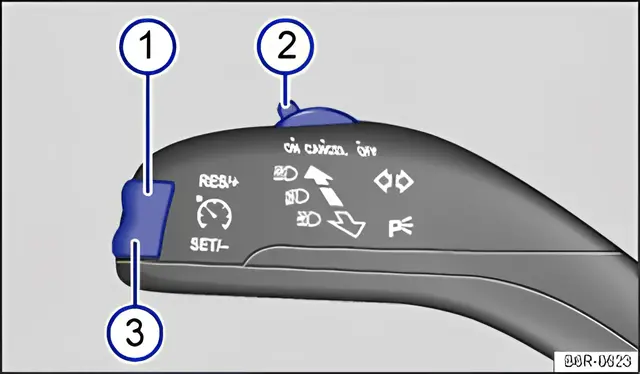
Fig. 125 On the left of the steering column: button and switch for the CCS
First read and observe the introductory information and safety warnings .
| Function | Switch position, switch control ⇒ fig. 125 | Action |
|---|---|---|
| Switching on the CCS. | Switch 2 in position ON | The system is switched on. No speed has yet been stored and the speed is not yet being controlled. |
| Activating the CCS. | Press button 3 SET/-. | The current speed is stored and controlled. |
| Switching off the CCS control temporarily. | Switch 2 in position CANCEL OR: depress the brake or clutch pedal. | Control is switched off temporarily. The speed is stored in the memory. |
| Resuming CCS control. | Press button 1 RES/+. | The stored speed is reactivated and controlled. |
| Increasing the set speed (during CCS control). | Press button 1 RES/+ briefly to increase the speed in small steps of 1 km/h (1 mph) and to save. | The vehicle accelerates actively until it reaches the new set speed. |
| Press and hold down button 1 RES/+ continuously to continuously increase the speed; the increased speed setting will be saved when you release the button. | ||
| Decreasing the set speed (during CCS control). | Press button 3 SET/- briefly to reduce the stored speed in small steps of 1 km/h (1 mph) and to save. | By easing off the accelerator and without actively braking, the system will decrease the speed until the new set speed is reached. |
| Press and hold button 3 SET/- to decrease the speed continuously. The new speed setting will be saved when you release the button. | ||
| Switching off the CCS. | Switch 2 in position OFF. | The system is switched off. The stored speed will be deleted. |
The mph figures given in brackets in the table relate exclusively to instrument clusters with mile readings.
Driving downhill with CCS
Section titled “Driving downhill with CCS”If the CCS cannot maintain the vehicle speed when driving downhill, brake the vehicle with the foot brake and shift down gear if necessary.
Automatic switch-off
Section titled “Automatic switch-off”The control will be switched off automatically or switched off temporarily:
- If the system detects a fault that could impair the function of the CCS.
- If the vehicle speed is higher than the stored speed for an extended period with the accelerator pedal depressed.
- If the brake pedal or clutch pedal is depressed.
- If you change gear on a manual gearbox.
- If the airbag is triggered.