Volkswagen information system
Introduction
Section titled “Introduction”This chapter contains information on the following subjects:
- Overview of the menu structure
- Using the menus in the instrument cluster
- Main menu
- MFD (multifunction display) menu
- Settings menu
With the ignition switched on, the different display functions can be accessed via the menus.
There are no buttons on the windscreen wiper lever in vehicles equipped with a multifunction steering wheel. The multifunction display is controlled using the buttons on the multifunction steering wheel only.
The scope of the menus in the instrument cluster display depends on the vehicle electronics and the level of vehicle equipment.
A qualified workshop may be able to program and modify other functions depending on the vehicle equipment level. Volkswagen recommends using a Volkswagen dealership for this purpose.
Some menu options can only be called up when the vehicle is stationary.
If any priority 1 warning reports are being displayed, you will be unable to call up any menus. Some warnings can be confirmed and switched off with the OK button.
Additional information and warnings:
Section titled “Additional information and warnings:”- Exterior mirrors
- Radio or navigation system ⇒ booklet Radio, or ⇒ booklet Navigation system
- Provision for mobile telephones ⇒ booklet Provision for a mobile telephone
After starting the engine with a discharged vehicle battery, or after the battery has been changed, system settings (time, date, personal convenience settings and programming) may have been changed or deleted. Check and correct the settings as necessary once the vehicle battery has been sufficiently charged.
Overview of the menu structure
Section titled “Overview of the menu structure”First read and observe the introductory information and safety warnings .
MFD (multifunction display)
Section titled “MFD (multifunction display)”Go to: information about the multifunction display.
- Driving time
- Current fuel consumption (Curr. fuel con.)
- Average fuel consumption (Av. consumption)
- Fuel range
- Distance
- Average speed
- Digital speed display
- Digital oil temperature display
- Speed warning function
⇒ booklet Radio, or ⇒ booklet Navigation system
Navigation
Section titled “Navigation”⇒ booklet Navigation system
Telephone
Section titled “Telephone”⇒ booklet Provision for a mobile telephone
Veh. status
Section titled “Veh. status”⇒ Overview of the menu structure / Veh. status
Settings
Section titled “Settings”⇒ Overview of the menu structure / Settings
- Language
- MFD data
- Driving time
- Current fuel consumption (Curr. fuel con.)
- Average fuel consumption (Av. consumption)
- Fuel range
- Distance
- Average speed
- Digital speed display
- Digital oil temperature display
- Speed warning function
- Time
- Hours
- Minutes
- 24h mode
- Summer time
- Winter tyres
- active
- +10km/h
- -10 km/h
- Units
- Temperature
- Consumption per journey
- Second speed display on/off
- Travel mode 1)
- Service
- Information
- Reset
- Factory setting
1) Depending on the vehicle, Travel mode may be found in the Lights & Vision submenu.
Using the menus in the instrument cluster
Section titled “Using the menus in the instrument cluster”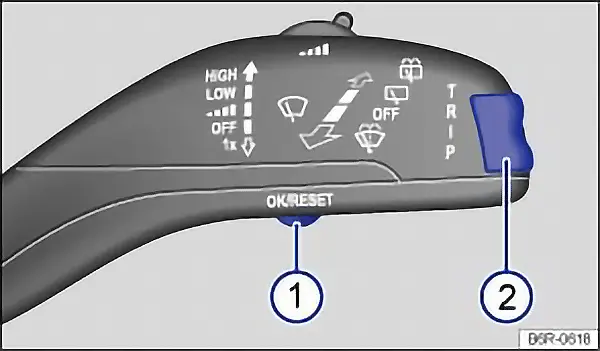
Fig. 13 Vehicles without multifunction steering wheel: press button 1 in the windscreen wiper lever to confirm the menu point and rocker switch 2 to change the menu.
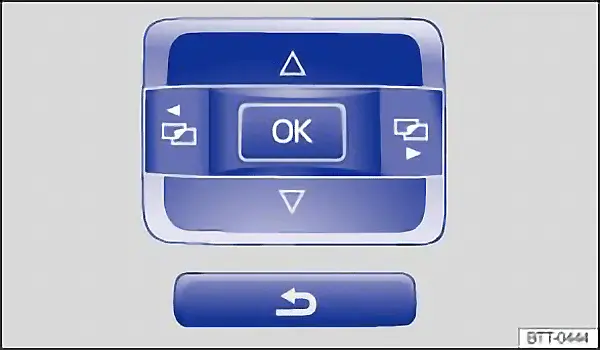
Fig. 14 Vehicles with multifunction steering wheel: control buttons for menus in the instrument cluster.
First read and observe the introductory information and safety warnings .
Calling up the main menu
Section titled “Calling up the main menu”Switch on the ignition.
If a message or vehicle pictogram is being displayed, press the OK/RESET button on the windscreen wiper lever ⇒ fig. 13 1, or the OK button on the multifunction steering wheel ⇒ fig. 14
When operated using the windscreen wiper lever: press and hold the rocker switch to display the main menu ⇒ returning to the main menu or to return to the main menu from another menu TRIP ⇒ fig. 13 2
When operated using the multifunction steering wheel: the main menu is not listed. To navigate through the individual menu options, press the or ⇒ fig. 14.
Opening a submenu
Section titled “Opening a submenu”Press the rocker switch TRIP button on the windscreen wiper lever up or down ⇒ fig. 13 2, or press the arrow buttons or button on the multifunction steering wheel, until the required menu option is selected.
The selected menu option is located between the two horizontal lines. There is also a triangle on the right-hand side .
To open the submenu, press the OK/RESET button on the windscreen wiper lever ⇒ fig. 13 1, or the OK button on the multifunction steering wheel ⇒ fig. 14.
Making settings in the menu
Section titled “Making settings in the menu”Make any desired changes using the rocker switch on the windscreen wiper lever or the arrow buttons on the multifunction steering wheel. If necessary, press and hold the controls to increase or decrease the values quickly.
Mark and confirm your selection by pressing the TRIP button on the windscreen wiper lever ⇒ fig. 13 1, or the OK button on the multifunction steering wheel.
Returning to the main menu
Section titled “Returning to the main menu”Within the menu: in the submenu, select the Back menu option to leave the submenu.
When operated using the windscreen wiper lever: press and hold the rocker switch TRIP ⇒ fig. 13 2.
When operated using the multifunction steering wheel: press the ⇒ fig. 14.
Main menu
Section titled “Main menu”First read and observe the introductory information and safety warnings .
| Menu | Function | See |
|---|---|---|
| MFA | Information and settings for the multifunction display (MFD). | ⇒ MFD menu |
| Audio | Station display in radio mode. | ⇒ booklet Radio, or ⇒ booklet Navigation system |
| Navigation | Information messages when the navigation system is switched on: | ⇒ booklet Navigation system |
| Phone | Information and settings for the provision for mobile telephone. | ⇒ booklet Provision for a mobile telephone |
| Veh. status | Current warning and information texts. | Instruments |
| Settings | Various settings for time, speed warning for winter tyres, language and units. | Settings menu |
MFD (multifunction display) menu
Section titled “MFD (multifunction display) menu”First read and observe the introductory information and safety warnings .
The multifunction display (MFD) is equipped with two automatic memories: 1 - Trip memory and 2 - Total journey memory. The number of the current memory on display will be shown in the upper right-hand corner of the display.
When the ignition is switched on and memory 1 or 2 is shown on the display, press the OK button to switch between the two memories.
| 1 | Trip memory | The memory collects the travel and fuel consumption data from the moment the ignition is switched on until it is switched off. |
| 2 | Total journey memory | The memory collects journey data for any number of individual journeys up to a total of 19 hours and 59 minutes or 99 hours and 59 minutes journey time, or 1,999.9 km or 9,999 km distance travelled, depending on the instrument cluster version. If one of these maximum limits is exceeded, the memory is automatically deleted and reset to 0. |
Possible displays
Section titled “Possible displays”| Menu | Function |
|---|---|
| Driving time | Driving time in hours (h) and minutes (min) that has elapsed since the ignition was switched on. |
| Current fuel consumption | While the vehicle is in motion, current consumption is displayed in l/100 km. When the engine is running and the vehicle is stationary it is measured in litres/hour. Depending on equipment levels, some vehicles will indicate the current number of active cylinders, e.g. 2 cylinders mode or 4 cylinders mode ⇒ Status display for active cylinder management. |
| Average fuel consumption | The average fuel consumption will be shown after a distance of approximately 100 metres has been travelled. The display will show dashes until this point. The displayed values will be updated approximately every 5 seconds. Depending on equipment levels, some vehicles will indicate the current number of active cylinders, e.g. 2 cylinders mode or 4 cylinders mode ⇒ Status display for active cylinder management. |
| Fuel range | Approximate calculation of the distance in km that can still be travelled with the current fuel level under the current driving conditions. One factor used for calculating this figure is the current level of fuel consumption. Depending on equipment levels, some vehicles will indicate the current number of active cylinders, e.g. 2 cylinders mode or 4 cylinders mode ⇒ Status display for active cylinder management. |
| Distance | The distance travelled in km since the ignition was switched on. |
| Average speed | The average speed will be shown after a distance of approximately 100 metres has been travelled. The display will show dashes until this point. The displayed values will be updated approximately every 5 seconds. |
| Digital speed display | Current vehicle speed displayed digitally. |
| Digital oil temperature display | Current engine oil temperature shown as a digital display. |
| Speed warning --- km/h | If the saved speed (within the range of 30 km/h (18 mph) and 250 km/h (155 mph)) is exceeded, an acoustic and, if necessary, visible warning will be emitted. |
Switching between displays
Section titled “Switching between displays”- Vehicles without a multifunction steering wheel: press the rocker switch on the windscreen wiper lever.
- Vehicles with a multifunction steering wheel: press the or .
Saving a speed for the speed warning
Section titled “Saving a speed for the speed warning”- Select the Speed warning --- km/h display.
- Press the OK button to save the current speed and activate the warning system.
- If necessary, use the rocker switch on the windscreen wiper lever or the or buttons on the multifunction steering wheel within approximately 5 seconds to set the required speed. Then press OK again or wait a few seconds. The speed is now saved and the warning is activated.
- To deactivate, press the OK button. The stored speed will be deleted.
Deleting memory 1 or 2 manually
Section titled “Deleting memory 1 or 2 manually”- Select the memory that you wish to delete.
- Press and hold the OK button for approximately 2 seconds.
Personal selection of displays
Section titled “Personal selection of displays”In the Settings menu, you can specify which of the MFD displays should be shown in the instrument cluster display. You can also change the units of measurement for the display ⇒ Settings.
Settings menu
Section titled “Settings menu”First read and observe the introductory information and safety warnings .
| Settings menu | Function |
|---|---|
| Language | Setting the language for the display texts and messages in the navigation system. |
| MFD data | Settings for which MFD data should appear in the instrument cluster display ⇒ MFD menu |
| Time | Setting the hours and minutes for the clock in the instrument cluster and in the navigation system. The time can be shown in a 12 and 24 hour display. An S may be shown in the upper part of the display to indicate that summer time is selected. |
| Winter tyres | Setting the visual and acoustic speed warning. Use this function only when winter tyres are fitted which are not designed for the vehicle’s top speed. |
| Units | Setting the units for temperature, consumption values and distances. |
| Alt. speed dis. | Switching the second speed display on or off. |
| Travel mode a) | Adjusting the headlights in countries in which the traffic drives on the other side of the road. A tick is visible when the headlights on a left-hand drive vehicle are switched for driving on the left. The travel mode may only be used for a short period. |
| Service | Call up service messages. |
| Factory settings | Some functions in the Settings menu are reset to the factory settings. |
| Back | The display returns to the main menu. |
a) Depending on the vehicle, the Travel mode menu option may be found in the Lights & Vision submenu.